Assigning a DMS Client Number to a Tax Return
Applicable to GoSystem Tax only.
To establish the link between a GoSystem Tax return database and the corresponding documents stored on GoFileRoom, you must assign a “DMS Client Number” to the tax return database.
To do this, update the Document Management System Information screen in GoSystem Tax, as follows:
- Select a tax return. Click the option box next to the subject tax return so that a check mark (P) appears to the left of the account number. Then click More, and select Update DMS Information.

- The Document Management System Information screen appears.
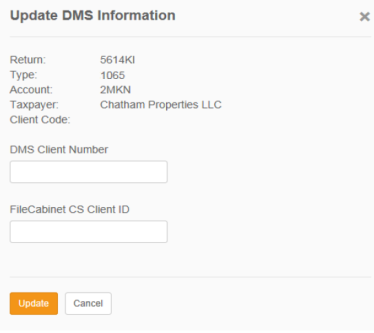
- Enter a value into the DMS Client Number text box which serves as the associated GoFileRoom “Client Number” index value for the selected tax return.
You cannot create DMS Client Numbers. Any value entered as a DMS Client Number must exist on the list of client numbers maintained by GoFileRoom for the selected “drawer.” If you enter a DMS Client Number on this screen that cannot be found on the list, the corresponding document cannot be saved on the GoFileRoom website.
- Click Update to save the value for the selected tax return.
- The Document Management System Information screen is replaced by an update confirmation screen.
- Click OK to close the confirmation screen. To bypass the entering and/or saving of a DMS Client Number for the selected tax return, click Close.
RS Browser/gofileroom_3.htm/TY2021
Last Modified: 10/22/2020
Last System Build: 02/03/2022
©2021-2022 Thomson Reuters/Tax & Accounting.
