Carson Case Study: Screen Components
Forms List Window
The Forms List Window is used to access the Organizer and Tax Form screens. The Forms List Window is similar to other file management systems. Organizer and Tax Forms reside within a hierarchical arrangement of folders that can be expanded and collapsed for convenient viewing and access. The folders expands to show additional folders and page icons. A single-page icon indicates one screen for data entry, while the multi-page icon indicates multiple screens or tabs for data entry. Multi-page Organizer screens use tabs to access these additional pages.
Two Forms List tabs, Organizer and Tax Forms, provide separate lists for their respective contents. You can open a folder, Organizer screen, or Tax Form screen by selecting the item in the list. When you open an Organizer screen or Tax Form screen, it appears in the Forms List pane on the right.
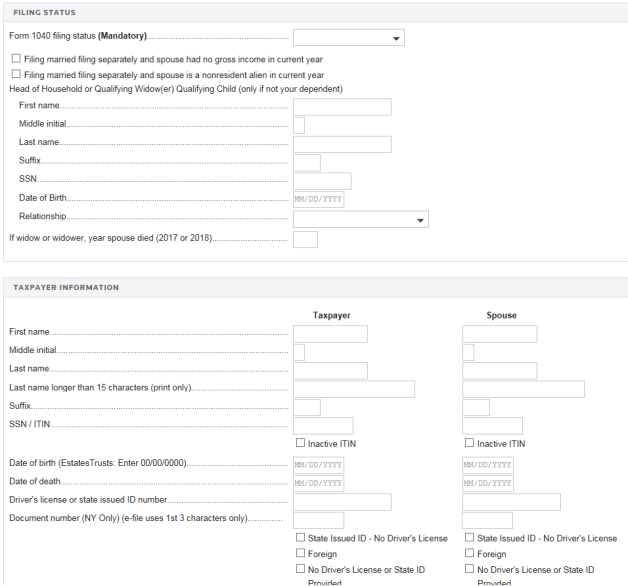
Organizer Screen
Information you enter in Organizer screens flows to the actual tax return.
Tax Forms Screen
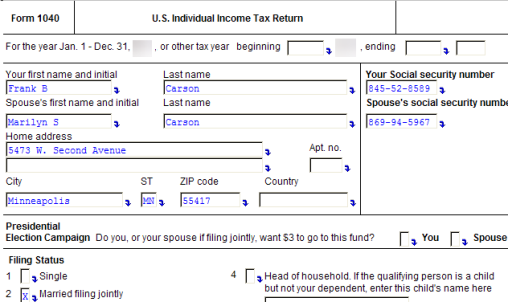
Tax Forms screens are on-screen facsimiles of the actual federal and state tax forms that are reproduced for the tax return.
Case Study Facts/carson_screen_components.htm/TY2019
Last Modified: 11/12/2019
Last System Build: 06/17/2021
©2019-2020 Thomson Reuters/Tax & Accounting.
